Seex, found

See the AI you actually run, including what nobody approved.

Models, agents, MCP servers and AI tools on one map, each with a named owner and a label saying how it was found.

The See capabilities

Specs

See, in detail

Delivery and data

Delivery
SaaS, from one login.
Isolation
Each customer runs in an isolated workspace with its own database.
Certifications
None held. Frameworks are mapped to and assessed against.

Frameworks

EU AI Act
Mapped to: An owned agent inventory, cross-mapped.
ISO/IEC 42001
Mapped to: The same inventory control, with evidence.
NIST AI RMF
Mapped to: Inventory under Map and Govern.
OWASP Top 10 for Agentic Applications
Assessed per agent against: Each registered agent, assessed.
See the frameworks

Last reviewed 6 Oct 2026

What are we running?

AI discovery and inventory in ColossalX finds the models, agents, MCP servers and AI tools your company runs, including the ones nobody approved. Each lands on one map with a named owner and a label saying how it was found, beside the AI bill of materials, the personal data each agent sends and what each model costs.

An agent nobody registered calls a model, and a team adopts a tool nobody assessed.

ColossalX finds both, in gateway traffic and through collectors, and puts each in front of an owner.

See · 5 capabilities

Five capabilities answer one question, what are we running, and each hands what it finds to a named owner instead of a spreadsheet.

AI inventory and agent map

Agents are found four ways: registered by hand, found in code, seen in gateway traffic and attested from CI or the cloud.

Explore
More

Each one lands on a live map with its models, tools, data and blast radius. Registered is not approved: admission still needs an accountable owner and a second approver, and a found agent waits, served under monitor, until both have decided.

Agent dossierIllustrative

An illustrative agent dossier: an agent found in gateway traffic with its own identity (a DID and hybrid post-quantum keys) and trust zone, and an admission checklist where the guardrail profile, the accountable owner and the second approver are in place, so it moves from monitor to admitted.
Shadow AI

People adopt AI tools faster than anyone can assess them.

Explore
More

ColossalX finds them in gateway traffic, through 13 collector types and with a browser sensor that never reads prompts, then matches each against your approvals. A tool that went around an approved provider shows as a bypass, not a new discovery, and one decision about it becomes a standing rule.

Shadow AIIllustrative

An illustrative Shadow AI list: a public chat assistant and a code assistant went around the gateway although their provider is approved there, a meeting notetaker and an image generator were never assessed, and a research assistant was assessed, each with the users seen.

3notes
  1. Approved provider, traffic went around
  2. No risk assessment on file
  3. Users seen for each app

AI bill of materials

An inventory lists what runs; an AI-BOM lists what it is built from.

Explore
More

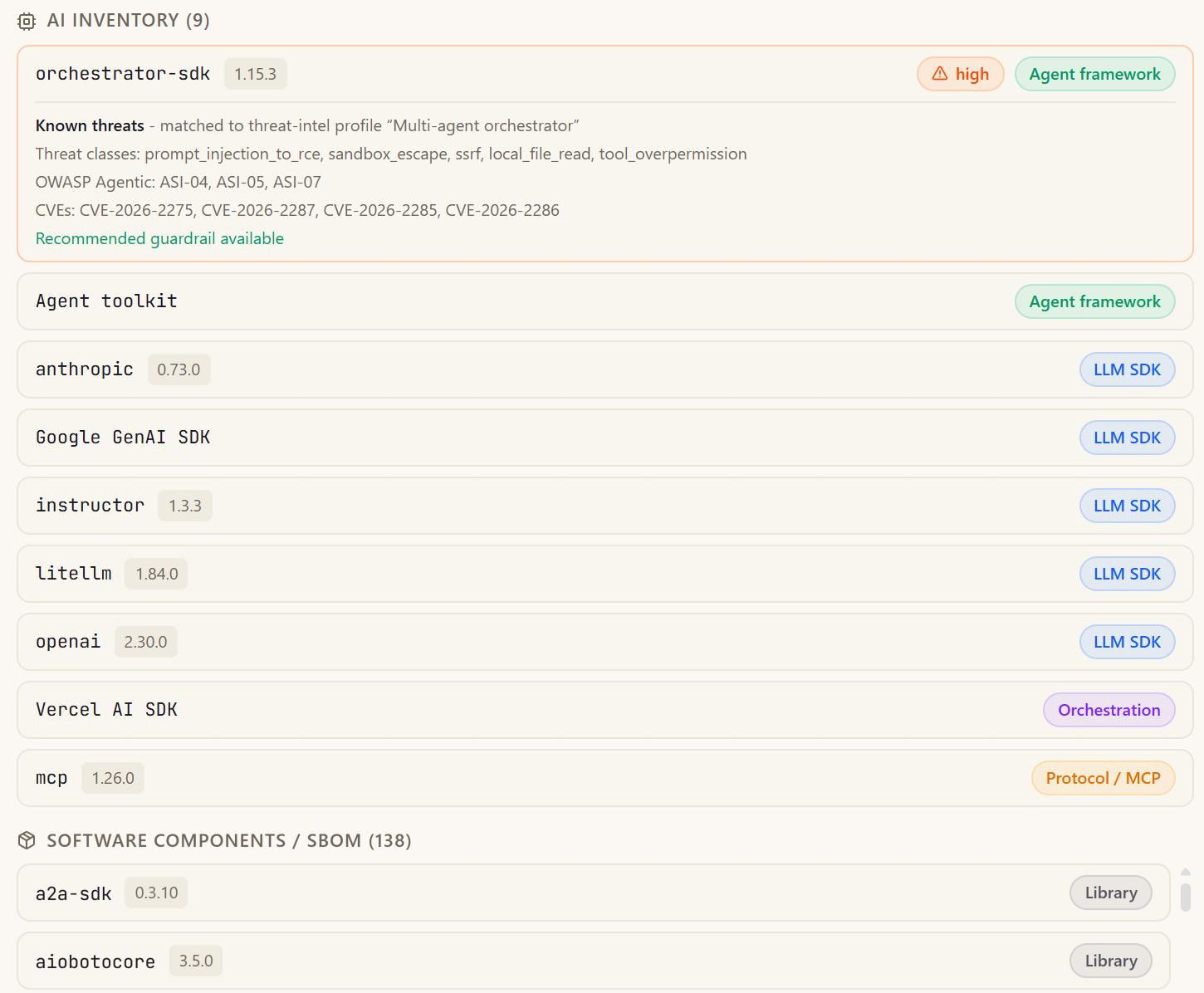
ColossalX produces SBOM and AI-BOM in CycloneDX and SPDX, keeps AI SDKs, agent frameworks, orchestration and MCP libraries apart from ordinary components, and compares each new scan with an approved baseline, so drift raises an alert the day it appears instead of waiting for the next audit.

One repository's bill of materials in a demo workspace: the AI inventory, with an agent framework matched to a threat profile and LLM SDKs, orchestration and MCP listed by kind, above the ordinary software libraries.
From a demo workspace
3notes
  1. AI parts, listed apart
  2. Threat profile matched
  3. Libraries, listed below

Data lineage

Which agent sent which personal data to which model, and was it sent, held back or returned?

Explore
More

Lineage is drawn from real gateway traffic rather than a questionnaire, so a data protection officer answers from records. Where a policy withheld personal data, the map marks the exact point where it stopped and names the rule that stopped it.

Lineage · from real trafficIllustrative

Lineage · from real traffic: client records to kyc-agent (read); kyc-agent to gateway (prompt); gateway with data redacted, to provider A (card data withheld).

AI spend

Cost by model, provider and conversation, with daily allowances per agent or team.

Explore
More

When an agent starts looping on the same call, its allowance stops it early and its owner is told, so a bad afternoon does not become a bad invoice. Finance sees the same figures the security team sees, drawn from the same gateway traffic, so nobody argues about the numbers.

Spend · one agent, one dayIllustrative

Spend · one agent, one day: 09:00 Allowance set (research-agent, per model); 11:42 Agent starts looping (same call, repeated); 11:43 Allowance reached; 11:43 Stopped, owner told.

How it works

From an AI tool nobody approved to a standing rule.

One AI tool nobody approved, followed from the first sighting to a standing rule, with a named person deciding at the one point that needs human judgement.

Workflow · an AI tool nobody approved, decidedIllustrative

01 Seen in use

The browser sensor finds an AI tool nobody assessed, without reading prompts.

02 Matched

Its provider is approved at the gateway, but this traffic went around.

03 Decided once

A named person decides; the decision becomes a standing rule.

04 Standing rule

Where a block cannot take effect, it is labelled recorded intent.

How it connectsx, found

Where a found x goes next.

A found agent or tool does not stop at the inventory. It moves on to the other three verbs, carrying its owner and its label.

  1. A found agent gets an owner, a second approver and a guardrail profile.

  2. Once it calls through the gateway, its requests and tool calls are checked.

  3. A registered agent can be attacked with authorisation, through your real controls.

  4. AI vendors in use but not assessed are flagged in the risk register.

Honest by design

What it does, and what it does not.

Where a block takes effectIllustrative

Where a block takes effect: employee to gateway (via the gateway); gateway refused before web chat tool (blocked); employee to local model (recorded intent).

What it does not do

x, not measured

Traffic discovery sees what calls through the ColossalX gateway; other agents are found from code, CI or collectors.

All 4 limits
  • Cloud placement is proven on AWS; Google Cloud, Azure and Kubernetes connectors are built, not yet proven.
  • A shadow AI block takes effect only where ColossalX sits in the path; elsewhere it is recorded intent.
  • Fingerprinting matches an anonymous caller to a known agent where it can; otherwise it is shown as new.

How we know

  • Each agent carries a provenance label saying how it entered the inventory.
  • Registered is not approved: an owner, a second approver and a guardrail profile.
  • Shadow AI is matched against your approvals, so a bypass shows as a bypass.
  • Data lineage is drawn from real gateway traffic, not from a questionnaire.

Questions

Questions buyers ask

How do you discover AI agents across an enterprise?

ColossalX finds agents four ways: registered by hand, found in code, discovered in gateway traffic and attested from CI or the cloud. Each agent carries a label saying how it entered, and behavioural fingerprinting recognises an agent by what it does, so an anonymous caller can be matched to a known agent.

What is the difference between an AI inventory and shadow AI discovery?

An AI inventory is the governed list of the models and agents you run, each with an owner. Shadow AI discovery finds the AI tools people use that nobody approved, from gateway traffic, collectors and a browser sensor. ColossalX matches one against the other, so a tool that went around an approved provider shows as a bypass.

Can ColossalX find agents in source code as well as in traffic?

Yes. Repository scans find agents and the AI libraries they import, and each agent found in code gets a threat brief built from its own code: what it can do, which risks follow and what to upgrade. Agents calling through the gateway are found in traffic, and the two views meet on one map.

How does ColossalX find and decide on MCP servers?

The MCP server inventory is learned from real requests through the gateway: which servers your agents reach and which agent first brought each one. A person approves or blocks each server with a reason, and a blocked server is refused for all agents, not only the one that brought it.

What does an AI bill of materials add to an inventory?

An inventory lists what runs. An AI-BOM lists what each thing is built from: the AI SDKs, agent frameworks, orchestration and MCP libraries inside a repository, separated from ordinary software components. Approve a baseline, and later scans are compared with it, so drift raises an alert.

The other verbs

Next step

Know your x.

See your own estate on one map: what you run, what nobody approved, and who owns each part.

  1. 01Tell us what you run
  2. 02See the four verbs on it
  3. 03Decide where to start